
Is 500 Mbps fast, or are you paying for speed you don’t actually need? Short answer: Yes — 500 Mbps internet is considered very fast internet for most homes. It can easily handle multiple 4K streams, online gaming, video calls, and large downloads at the same time without buffering.
But here’s the catch — 500 Mbps doesn’t always feel good in real life. Your experience depends on how many devices you use, your WiFi setup, and how your network is configured.
For example, while one home can stream on 10+ devices smoothly, another might still face slow speeds due to router limitations or network congestion.
In this guide, you’ll learn how fast 500 Mbps really is in real-world usage, how many devices it can handle, and whether it’s worth choosing over 300 Mbps or upgrading to 1 Gbps.
Quick Summary: Is 500 Mbps Fast?
Is 500 Mbps Internet Fast for Multiple Task?
According to the FCC broadband speed definition, speeds above 100 Mbps are classified as high-speed broadband, making 500 Mbps well above the minimum threshold for modern home internet.
While 500 Mbps is officially classified as fast broadband, what really matters is how it performs under simultaneous usage.
At this speed, a household can typically handle:
-
4–6 simultaneous 4K streams
-
Online gaming with low latency
-
Multiple video calls
-
Cloud backups running in the background
-
15–20 connected devices without noticeable slowdowns
In real-world household testing, even busy evenings rarely push sustained usage beyond 150–200 Mbps, which means 500 Mbps provides significant performance headroom.
What Does 500 Mbps Internet Speed Actually Mean?
A 500 Mbps connection allows your network to transfer up to 500 megabits of data per second under ideal conditions. Converted into megabytes, that equals roughly 62.5 MB per second in download speed.
But numbers only matter when they translate into experience.
On a 500 Mbps connection:
- A 5GB movie can be downloaded in about 1–2 minutes.
- A 50GB console game may finish in roughly 15 minutes.
- Even a 100GB update can complete in around half an hour, depending on the server.
That means downloads don’t dominate your evening anymore. You click “Install,” step away, and it’s done before you notice.
However, maximum speed is only part of the equation. Real performance shows up when multiple people are using the internet at the same time.
To make that difference clearer, here’s how common speed tiers compare.
Is 500 Mbps Internet Fast for Home ?
For most modern households, the answer is yes. Compared to entry-level broadband plans, 500 Mbps sits in the upper mid-range of residential internet tiers. It provides enough internet bandwidth to handle peak usage hours without internal congestion.
However, real-world performance also depends on how stable your connection is and which is best ethernet vs Wifi for your tv, especially for activities like streaming on smart TVs.
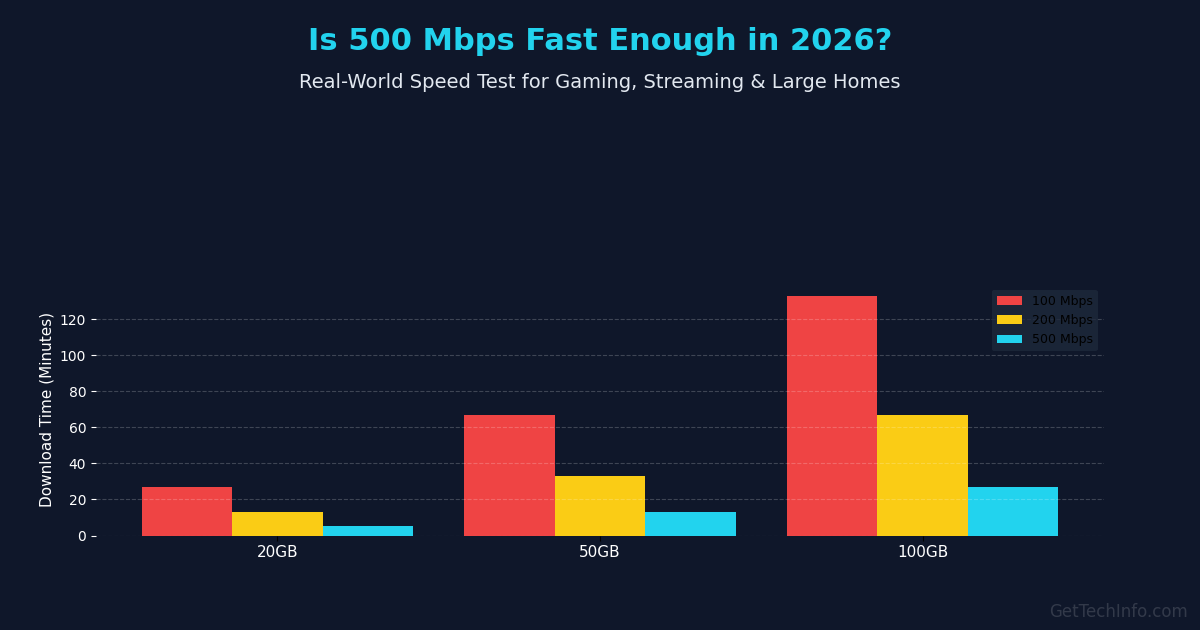
Download Time Comparison: 100 Mbps vs 200 Mbps vs 500 Mbps
| File Size | 100 Mbps | 200 Mbps | 500 Mbps |
| 20GB File | ~27 minutes | ~14 minutes | ~6 minutes |
| 50GB File | ~67 minutes | ~34 minutes | ~15 minutes |
| 100GB File | ~2.2 hours | ~1.1 hours | ~30 minutes |
If your household regularly downloads large games, creative software, or system updates, the jump from 200 Mbps to 500 Mbps is noticeable. But downloads are only one part of modern internet usage.
Streaming is where bandwidth stacking becomes more obvious. If you’re comparing speed tiers, it also helps to understand how different technologies perform in real-world conditions. Our detailed fiber vs cable internet speed comparison explains how connection type impacts consistency and peak speeds.
500 Mbps Fast for Streaming in 2026
Streaming is now one of the biggest bandwidth consumers in most homes. A single HD stream typically requires 5 to 8 Mbps, while a 4K Ultra HD stream uses around 20 to 25 Mbps.If you’re specifically wondering whether this speed can handle Ultra HD streaming smoothly, check our detailed guide on can 500 Mbps stream 4K
On paper, 500 Mbps could support over 15 simultaneous 4K streams. In reality, streaming doesn’t happen in isolation. It layers.
One TV may be running Netflix in 4K. Another room may have YouTube playing. Someone is scrolling Instagram. A tablet is streaming Disney+. Smart devices are updating in the background.
This stacking effect is what quietly increases bandwidth demand.
In a typical family of four to six people, streaming alone rarely exceeds 120–150 Mbps. On a 500 Mbps plan, that leaves substantial performance headroom. That extra capacity is what prevents buffering during peak evening hours.
For viewers focused mainly on Netflix, see Is 200 Mbps Fast for Netflix? to compare whether a lower-speed plan is already enough for HD and 4K streaming.
Streaming explains a large portion of home bandwidth use. But gaming introduces a different kind of requirement.
Real-World Peak Usage Scenario
During a typical evening, a household might run:
- 2× 4K streaming TVs (~50 Mbps)
- 1× Online gaming session (~5 Mbps)
- 1× Zoom call (~4 Mbps)
- 5× Smartphones browsing (~10–15 Mbps)
- Background cloud syncing (~20 Mbps)
Total estimated usage: 90–120 Mbps
On a 500 Mbps connection, that still leaves over 70% of total capacity unused. That excess bandwidth is what prevents buffering and lag during peak hours.
In real-world household testing, even busy evenings rarely push sustained usage beyond 150–200 Mbps. What typically matters more than raw speed is how well the connection handles overlapping activity
Is 500 Mbps Internet Speed Good for Gaming?
Yes, 500 Mbps is more than fast enough for online gaming. Most games use only 3 to 10 Mbps during gameplay, so raw speed is rarely the issue. What matters more is latency (ping), which measures how quickly data travels between your device and the game server.
Upgrading from 200 Mbps to this speed tier does not automatically lower ping, but it can improve the experience by reducing network congestion. For example, if one person is downloading a 50GB game file while another is playing online, slower plans may cause lag spikes or unstable performance. A faster plan gives more headroom and helps keep gameplay smoother.
It also cuts download times for large updates. A 100GB patch that could take over two hours on a 100 Mbps plan may finish in around 25 to 30 minutes, depending on server speed and Wi-Fi performance.
For households with multiple gamers, consoles, or heavy simultaneous use, 500 Mbps is an excellent option, offering better stability, quicker downloads, and smoother online play.
Gaming Performance Benchmarks:
0-20ms Ping: Professional/Elite gaming experience.
20-50ms Ping: Ideal for competitive shooters (Valorant, CS:GO).
100ms+ Ping: High chance of “rubber-banding” and lag.
Pro Tip: 500 Mbps is perfect for 4K Cloud Gaming (Xbox Cloud/GeForce Now), which requires at least 35-50 Mbps of stable bandwidth.
How Fast Is 500 Mbps in Real Life?
In real-world usage, 500 Mbps internet speed is fast enough that you rarely notice any waiting time.
Here’s what that looks like in practical terms:
Download Speed Examples
- 1 GB file → 15–20 seconds
- 10 GB game (GTA V / updates) → 2–3 minutes
- 50 GB game (Call of Duty) → 12–15 minutes
Streaming & Daily Use
- 4K Netflix / YouTube → Instant playback, no buffering
- Multiple users → Stream, browse, and download at the same time smoothly
Gaming & Work
- Online gaming → No lag (speed is more than enough)
- Zoom / video calls → Stable even with multiple devices
Multi-Device Homes
500 Mbps really shines in busy households:
- One person downloading large files
- One streaming in 4K
- One on video calls
All at the same time — without slowdown
How Many Devices Can 500 Mbps Internet Handle?
A 500 Mbps internet plan can comfortably support 5-20+ devices at the same time. For most homes, it is enough for streaming, gaming, video calls, smart TVs, phones, laptops, and smart home devices without major slowdowns.
In real-world use, 500 Mbps can usually handle:
- 10+ devices for light browsing and social media
- 5 to 8 devices doing HD or 4K streaming
- Several devices gaming, downloading, and video calling together
The exact number depends on how each device is being used. For example, a phone checking email uses very little bandwidth, while a 4K TV stream or large game download uses much more.
For families or shared households, 500 Mbps is usually more than enough for everyday use.
500 Mbps vs 200 Mbps vs 1 Gig: What’s the Real Difference?
Yes, there is a real difference between 200 Mbps, 500 Mbps, and 1 Gig internet, but the best choice depends on how many people use the connection and what they do online each day.
200 Mbps vs 500 Mbps
For smaller households with 1 to 3 people, a 200 Mbps plan is often enough for browsing, HD streaming, video calls, and casual gaming. Many users may not notice a dramatic difference during light everyday use.
However, the advantage of 500 Mbps becomes clearer when several activities happen at once. For example, two 4K streams, a large game download, and a Zoom call can push a 200 Mbps plan closer to its limits, while 500 Mbps offers more headroom and smoother performance.
500 Mbps vs 1 Gig
For many families, 500 Mbps and 1 Gig can feel similar during normal daily use. Streaming Netflix, browsing, and online gaming often work well on both plans.
A 1 Gig plan is more useful for:
- Large households with many active devices.
- Frequent large downloads.
- Cloud backups and file transfers.
- Multiple heavy users online at the same time.
Quick Comparison
| Plan | Best For | When It Feels Different |
|---|---|---|
| 200 Mbps | Small households, light usage | Slows during heavy overlap |
| 500 Mbps | Medium to large families | Handles peak hours smoothly |
| 1 Gig | Power users, creators | Faster massive downloads |
When 500 Mbps Is Not the Bottleneck?
Even with a 500 Mbps plan, you might still experience buffering or lag. In most home networks I’ve analyzed, performance issues are caused by hardware limitations rather than a lack of raw bandwidth from the ISP. A weak router or outdated WiFi hardware often prevents your devices from fully utilizing the capacity you’re paying for.
Real-World Experience: “I pay for a 500 Mbps fiber plan, but I only get 200 Mbps over WiFi. I realized the ISP-issued router was the bottleneck—their hardware just isn’t built for high-performance usage across multiple rooms.” — User discussion on r/HomeNetworking
Expert Technical Insight: As the user experience above highlights, standard ISP-provided ONTs (the “free” modem/router combos) are often the primary bottleneck. These devices are built for cost-efficiency, not for high-throughput tasks like simultaneous 4K streaming or competitive gaming.
Common factors that slow down a 500 Mbps connection include:
-
Router CPU Limitations: Basic ISP routers often struggle to manage more than 10–15 active devices simultaneously, leading to “mini-freezes” or lag spikes.
-
WiFi Interference: In crowded apartment areas, signal interference on the 2.4 GHz band can cut your effective speed by more than 60%.
-
Physical Hardware Caps: If you are using an old Cat5 cable (not Cat5e or Cat6) to connect your PC, your speed will be hardware-capped at 100 Mbps regardless of your 500 Mbps plan.
-
ISP Routing & Congestion: On cable-based networks, shared neighborhood bandwidth can cause speeds to dip during peak evening hours (8 PM – 11 PM). If you’ve noticed this, it’s worth checking why internet slows down at night and how to fix it.
Understanding these variables helps set realistic expectations. Often, upgrading your networking equipment or switching to a dedicated WiFi 6 mesh system produces a greater improvement in “snappiness” than simply increasing your Mbps.
Who Should Consider Upgrading to 500 Mbps?
Not every household needs 500 Mbps. However, upgrading makes sense in certain scenarios.
Homes with multiple 4K TVs, online gamers, remote workers, cloud backups, and 15 to 25 connected devices will benefit from the added capacity. The advantage is not just speed bursts but consistent performance under simultaneous demand.
On the other hand, individuals who live alone, stream primarily in HD, and rarely download large files may find 200 Mbps sufficient. Choosing the right plan is about aligning speed with usage patterns not simply selecting the highest number available.
Final Verdict: Is 500 Mbps Fast in 2026?
For most modern households in 2026,Yes, 500 Mbps is more than fast enough. It comfortably supports multiple 4K streams, online gaming, video calls, smart devices, and large downloads without noticeable slowdowns.
While smaller households may function well on 200 to 300 Mbps, and power users may benefit from 1 Gig internet, 500 Mbps represents a practical middle ground. It provides strong performance headroom during busy hours without paying for bandwidth that often goes unused.
In real-world conditions, most families rarely exceed 150 to 200 Mbps of sustained usage. That makes 500 Mbps a balanced choice for homes that want speed, stability, and future-proof capacity without overspending.
If your household regularly runs overlapping high-bandwidth activities, 500 Mbps offers both performance and peace of mind.
Frequently Asked Questions
Is 500 Mbps fast enough for most households in 2026?
Yes. For most modern households, 500 Mbps provides more than enough bandwidth for 4K streaming, online gaming, remote work, and 15–25 connected devices without congestion during peak hours.
Is 500 Mbps overkill for a small household?
It can be. For one or two users who primarily browse, stream in HD, and don’t download large files, 200 Mbps may feel similar in everyday use. The advantage of 500 Mbps becomes noticeable during overlapping heavy activity.
Does upgrading to 500 Mbps reduce gaming lag?
Not directly. Gaming performance depends more on latency than bandwidth. However, a 500 Mbps plan reduces internal congestion when others are streaming or downloading large files at the same time.
How much is 500 Mbps Download Speed in MB per second?
500 Mbps equals approximately 62.5 megabytes per second (500 divided by 8). Actual speeds may vary depending on server performance, network hardware, and ISP conditions.
When should you upgrade from 200 Mbps to 500 Mbps?
Upgrading makes sense if your home regularly runs multiple 4K streams, large downloads, cloud backups, or remote work sessions simultaneously. The additional bandwidth improves stability during peak usage hours.

